Short version: AI is changing the workflow, but the fundamentals of a strong website are becoming more important, not less: clear positioning, useful content, responsive UX, accessibility, performance, search-friendly structure and a trustworthy path to action.
AI makes website production faster. It does not define the right website.
In 2026, it is easy to generate a landing page concept, draft a headline, create placeholder imagery or ask an AI coding assistant for a component. That changes the speed of production. It does not automatically answer the strategic questions: Who is the website for? What does the business want the visitor to understand? What proof reduces risk? Which action matters most? What should be removed?
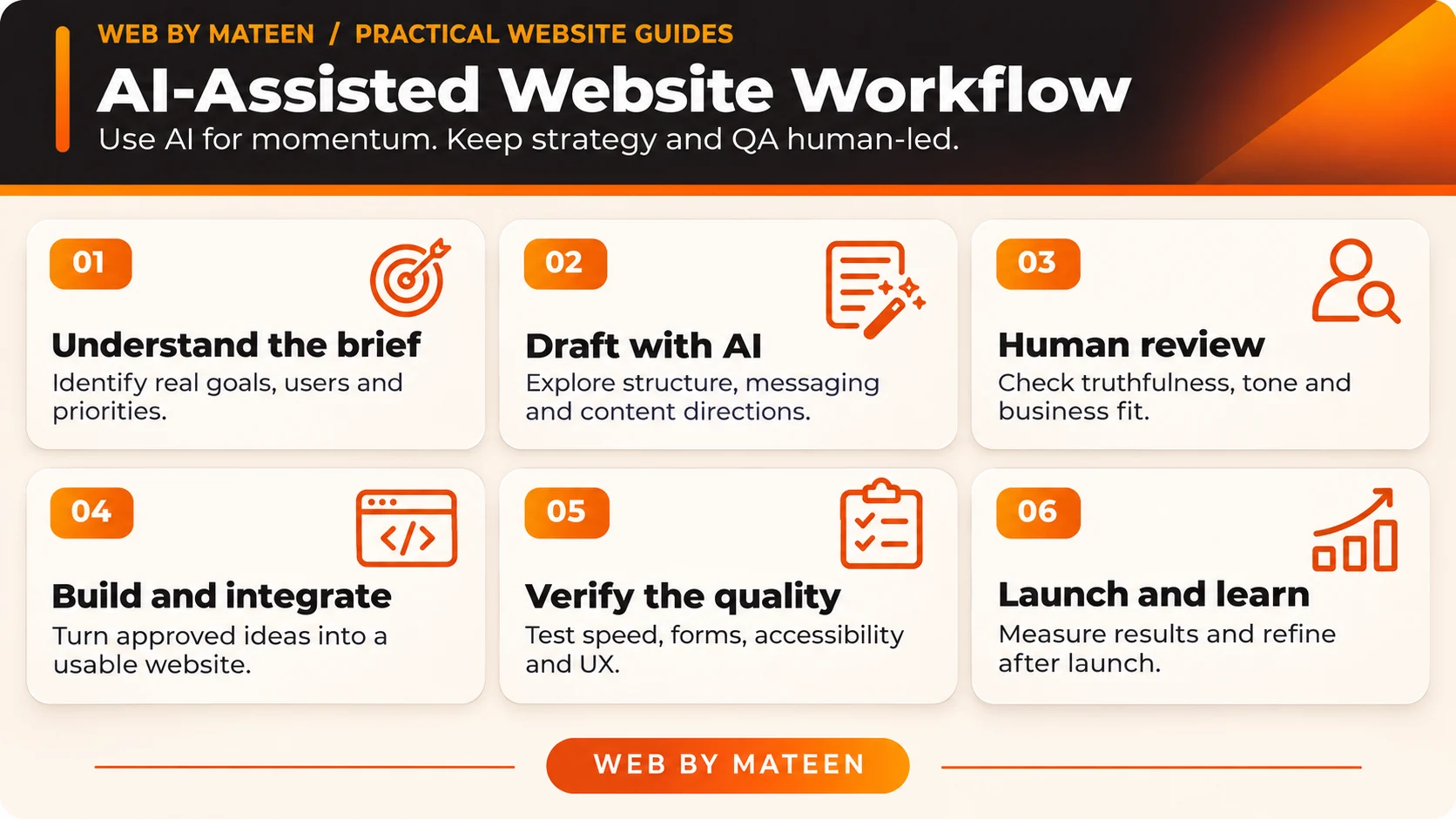
The strongest workflow uses AI as an assistant inside a clear process. Research can be summarized faster, alternatives can be explored quickly and repetitive implementation work can be reduced. The designer or developer still has to decide what deserves attention and what should not exist on the page.
1. Clear positioning is more valuable when everyone can generate content
When businesses can produce more copy and more pages quickly, generic content becomes easier to create and easier to ignore. A website needs a clear value proposition, useful proof and a structure that helps a real visitor understand why the business is relevant.
That is why my website design and development services starts with the business goal and user journey rather than choosing a visual style first.
2. UX should reduce decisions, not create more interface
AI tools can produce many interface variations, but more options do not automatically create a better experience. Good UX in 2026 still means hierarchy, predictable navigation, readable content, accessible interaction and clear next steps across desktop and mobile.
For service businesses, this often means explaining the offer clearly, showing relevant proof, answering key objections and making the enquiry path obvious. For e-commerce, it means reducing friction around discovery, product information, trust and checkout. The details change; the principle stays the same.
3. Performance and technical quality still shape the experience
A visually impressive site can still feel poor if it loads slowly, shifts while loading, blocks interaction or becomes difficult to use on a phone. AI-generated code also needs review. Extra libraries, duplicated styles and unnecessary scripts can make a simple page heavier than it needs to be.
I prefer a lean approach: optimize images, load only what the page needs, keep interactions purposeful and choose WordPress and Elementor or custom front-end code based on the project rather than forcing every site into one stack.
A real mobile-speed problem that an AI draft could not validate for me
On 31 October 2026, I investigated mobile loading problems on my own Web by Mateen website. Individual PageSpeed Insights laboratory tests had shown a slow Largest Contentful Paint (LCP) even when the page started displaying text earlier. A polished-looking homepage was not enough to demonstrate that it was loading well for visitors.
I checked which first-screen element Lighthouse identified as the LCP, whether mobile browsers were downloading artwork meant for desktop, when the important image request began, and whether nonessential resources competed with the first render. A separate desktop layout-shift issue required a different investigation.
The check
Identify the measured LCP element, confirm the real network requests, and record what changed in the deployed files.
The release rule
Protect working contact forms, mobile navigation, analytics, search verification and current content while testing a small, reversible change.
Use this on your site: Run a mobile PageSpeed test, note the LCP element and the requests ahead of it, then make one controlled change and compare repeat tests. Individual lab readings vary; no single score is a performance guarantee.
4. WordPress still makes sense when maintainability matters
WordPress remains practical for many business websites because clients can manage pages and content without rebuilding the entire project. The important part is how it is implemented. A clean WordPress or Elementor website should avoid plugin overload, use a consistent design system and keep content structure understandable for the team that will maintain it.
If you already have a WordPress website that feels outdated, a website redesign or restructuring may be more useful than replacing everything blindly.
5. SEO in the AI era is connected to usefulness, structure and credibility
Search optimization is not a separate layer added after design. A website should make important pages crawlable, use meaningful headings, connect related pages with internal links, provide descriptive metadata and answer the questions the target audience actually has.
AI can help with research and drafting, but publishing large amounts of generic material is not a strategy. Strong content should reflect real expertise, useful examples, original project experience and clear intent. That is also why this website connects articles to real portfolio work, professional experience and relevant services instead of treating the blog as an isolated section.
For the next implementation step, explore my SEO services, custom CRM and web app development when your project needs search visibility or workflow-specific functionality.
6. Trust signals matter more when synthetic content is everywhere
Real client reviews, recognizable project examples, transparent contact details, a clear process and a consistent personal or business identity help visitors decide whether they can trust the person behind the website. In an AI-heavy environment, proof is valuable because it connects the claims on a page to real work and real people.
You can see this approach across my selected website projects and client testimonials throughout the site.
If you are comparing website budgets, read the 2026 business website cost guide for scope, pricing and quote-comparison guidance.
Use AI where it saves time, but keep the strategy human.
Share your business goal and current website. I’ll help shape the structure, design direction and development approach around the project.
7. Accessibility should be part of the design system
Readable contrast, keyboard-friendly interaction, sensible focus states, form labels, alternative text and responsive typography should be considered during design and development. Accessibility is easier to maintain when it is built into components and content patterns instead of treated as a final checklist.
8. The best AI workflow keeps a human review loop

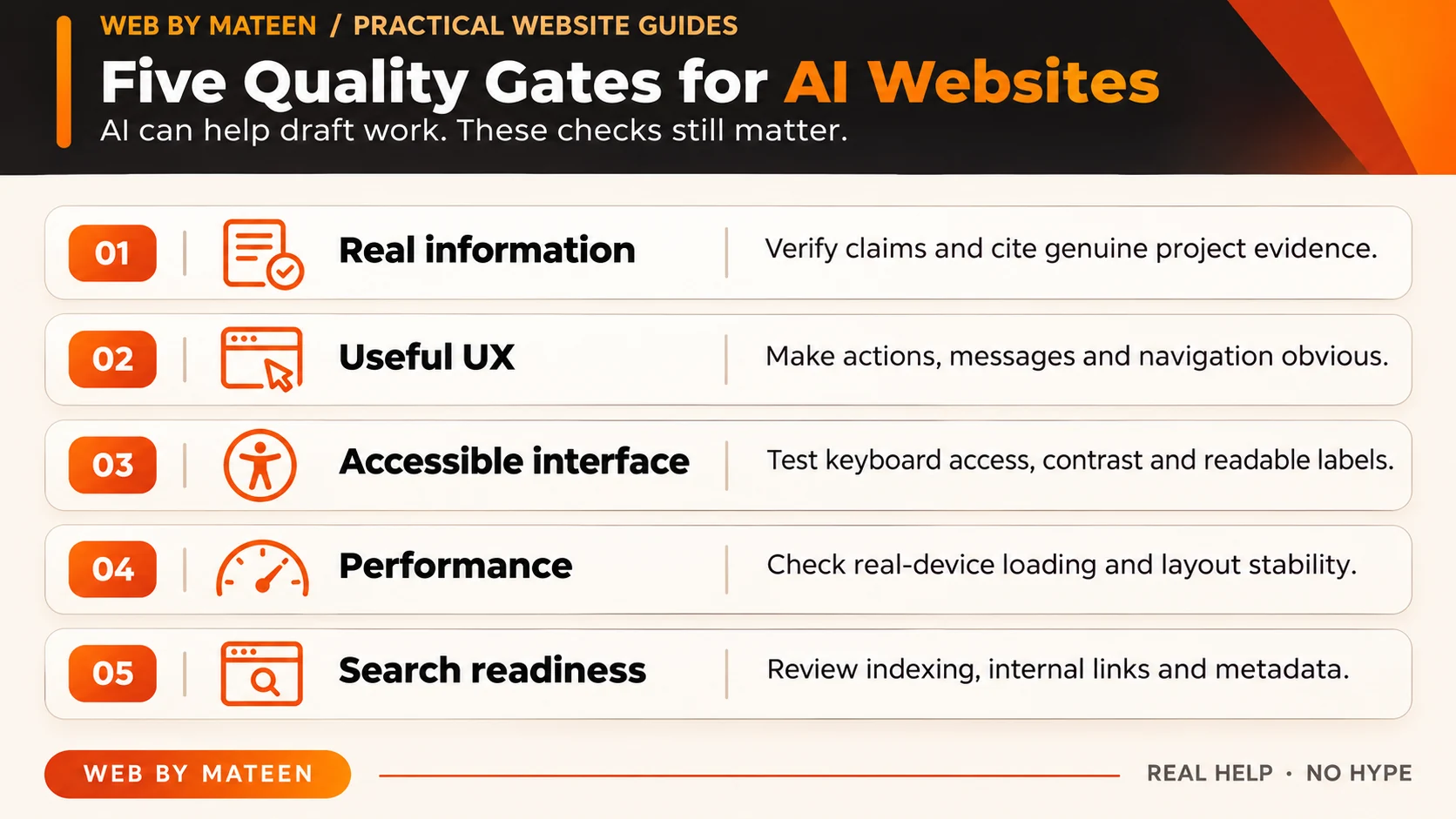
A practical AI-assisted workflow can include research summaries, content outlines, alternative headlines, code assistance, testing ideas and repetitive production tasks. The final review should still check factual accuracy, tone, accessibility, responsive behavior, performance, security, brand consistency and whether the page actually supports the intended business action.
That is also why I prefer using real, permission-cleared project evidence where possible. Instead of only saying that AI helped with product work, I can show current screens from Mateen Freelance OS—a custom CRM I use in my own workflow—so readers can evaluate an actual interface rather than a generic claim.
What I would verify before publishing an AI-assisted website.
AI can speed up drafts, but a business owner still needs accountable decisions. These checks distinguish a working website from generated visuals that only look complete.
Local on-page planning only; selections are not submitted or saved. Review the full article and your real project requirements.
What AI can help draft, and what I still verify myself
Discovery and content
AI can suggest questions and outlines. I verify business facts, actual services, the audience and the strength of each claim before publishing.
Design and development
AI can propose interface variants and code. I check readable hierarchy, real mobile interactions, accessibility, dependencies and security.
Launch and measurement
AI can generate QA scenarios. I test submitted forms, navigation, analytics events, redirect behavior and a genuine rollback path.
Real product proof
My Mateen Freelance OS case study shows published screenshots of its prospecting, outreach, client and billing workflows. Those images show the working interface, not proof that a specific AI prompt produced it.
Simple release record: observed problem → proposed change → files affected → features to preserve → test result → rollback condition.
A practical website design process for 2026
Website design in 2026: the real advantage
The advantage is not having access to AI. Most businesses and competitors have access to similar tools. The advantage is using those tools inside a better decision-making process and combining them with business understanding, UX judgement, technical quality and real-world proof.
If you are planning a new site or redesign, start with the project brief, review my website design services, or book a focused project conversation.
Useful answers in the AI era.
Clear answers on AI, content, WordPress and the human decisions that still shape a strong website.
Will AI replace website designers and developers?+
AI is automating parts of research, drafting, prototyping and coding, but businesses still need human decisions around positioning, UX, accessibility, technical quality, brand trust and conversion.
Should a business use AI-generated website content?+
AI can help with research and drafts, but the final content should be accurate, specific, useful, brand-appropriate and reviewed by a person who understands the business.
Is WordPress still a good choice in 2026?+
Yes, when a business needs flexible content management and a maintainable website. The quality depends on the implementation, plugin choices, design system and performance discipline.